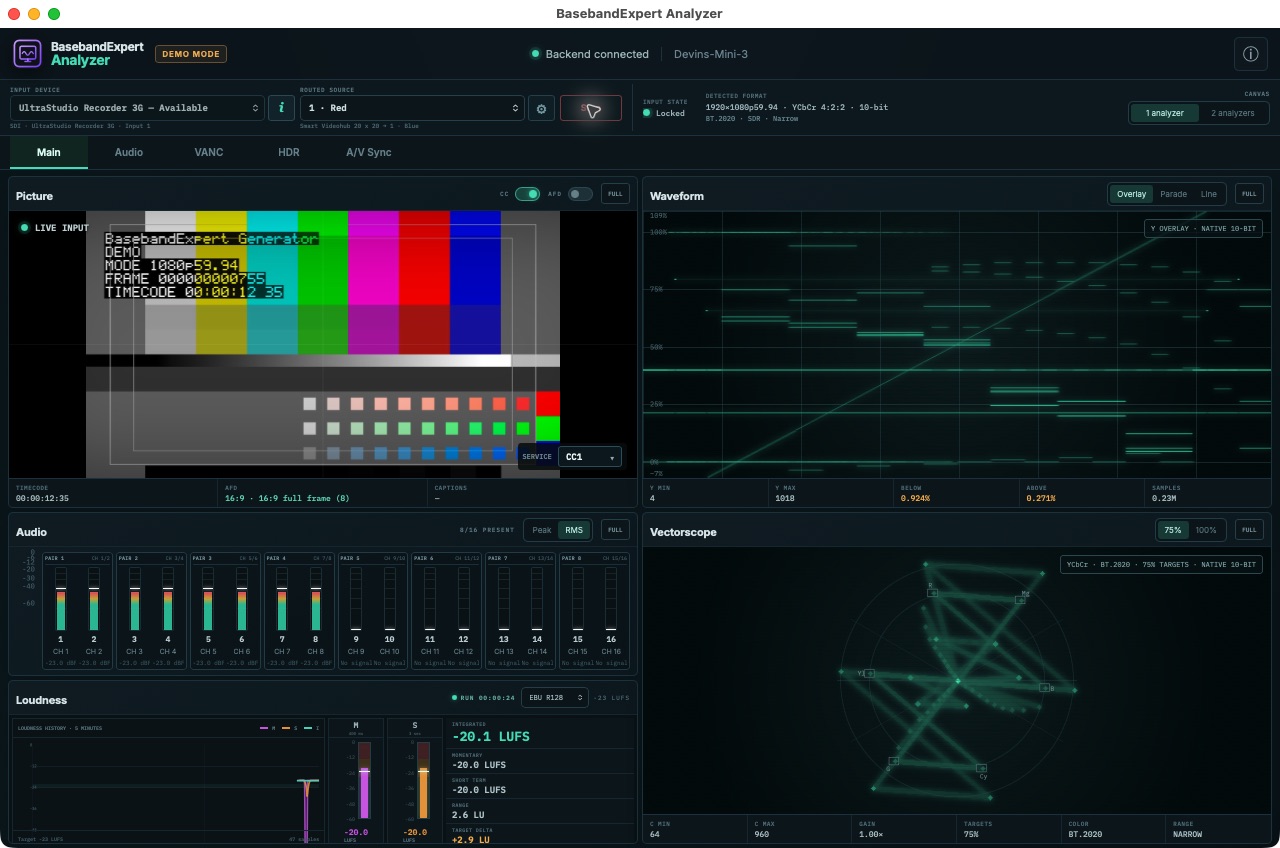
BasebandExpert Analyzer inspects live SDI, ST 2110, and NDI® signals through one dense engineering canvas for picture, waveform, vectorscope, audio, loudness, captions, ancillary data, HDR, A/V sync, and capture health.
PlatformsmacOS + LinuxInputSDI + ST 2110 + NDI®Primary jobDeep inspection
Main · picture, scopes, audio, loudness, and signal statusMore
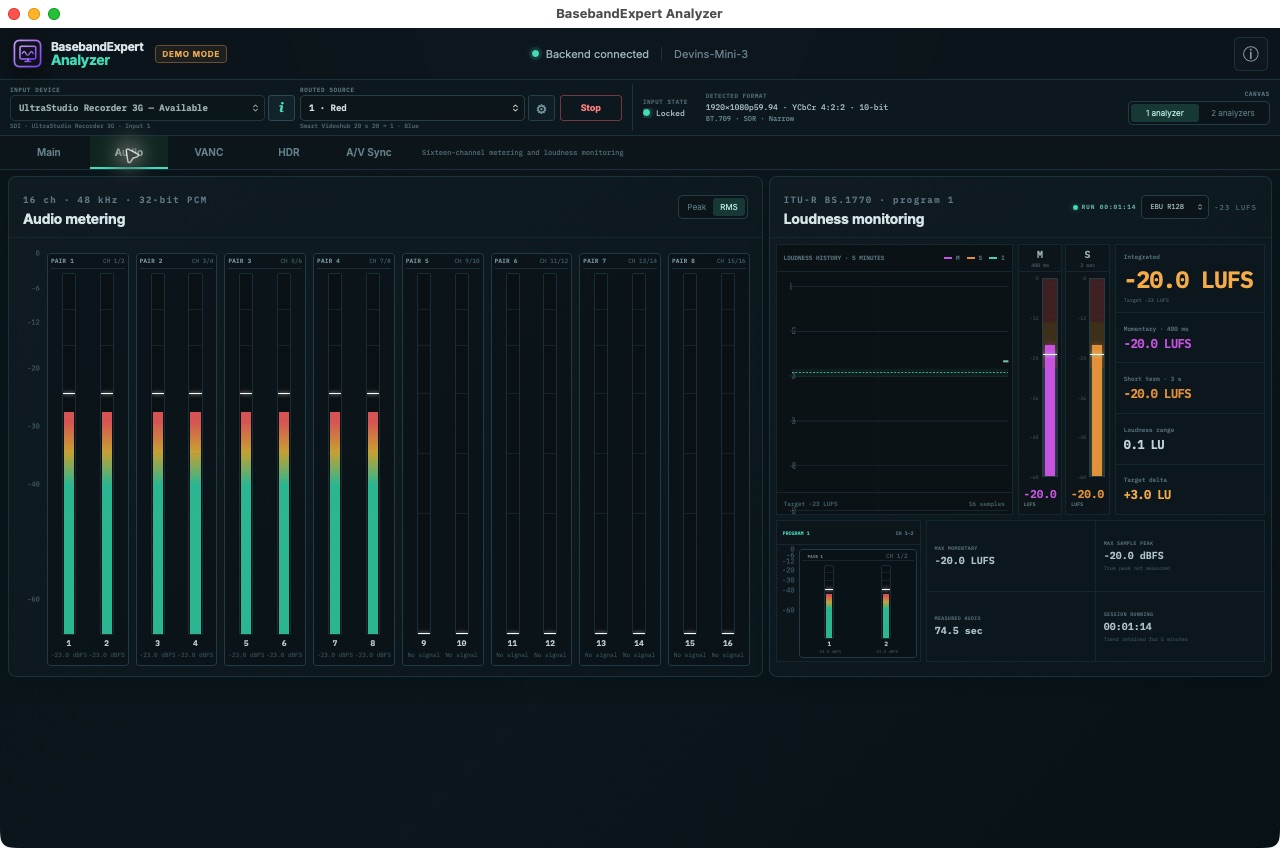
Audio
Meter every channel, then measure the program.
The Audio tab gives channel activity and program loudness room to breathe, making it easy to separate a missing channel from a loudness problem.
Sixteen-channel peak or RMS metering
ITU-R BS.1770 momentary, short-term, integrated, and loudness-range measurements
EBU R128, ATSC A/85, and custom targets
Audio · channel presence, level, history, and program loudness
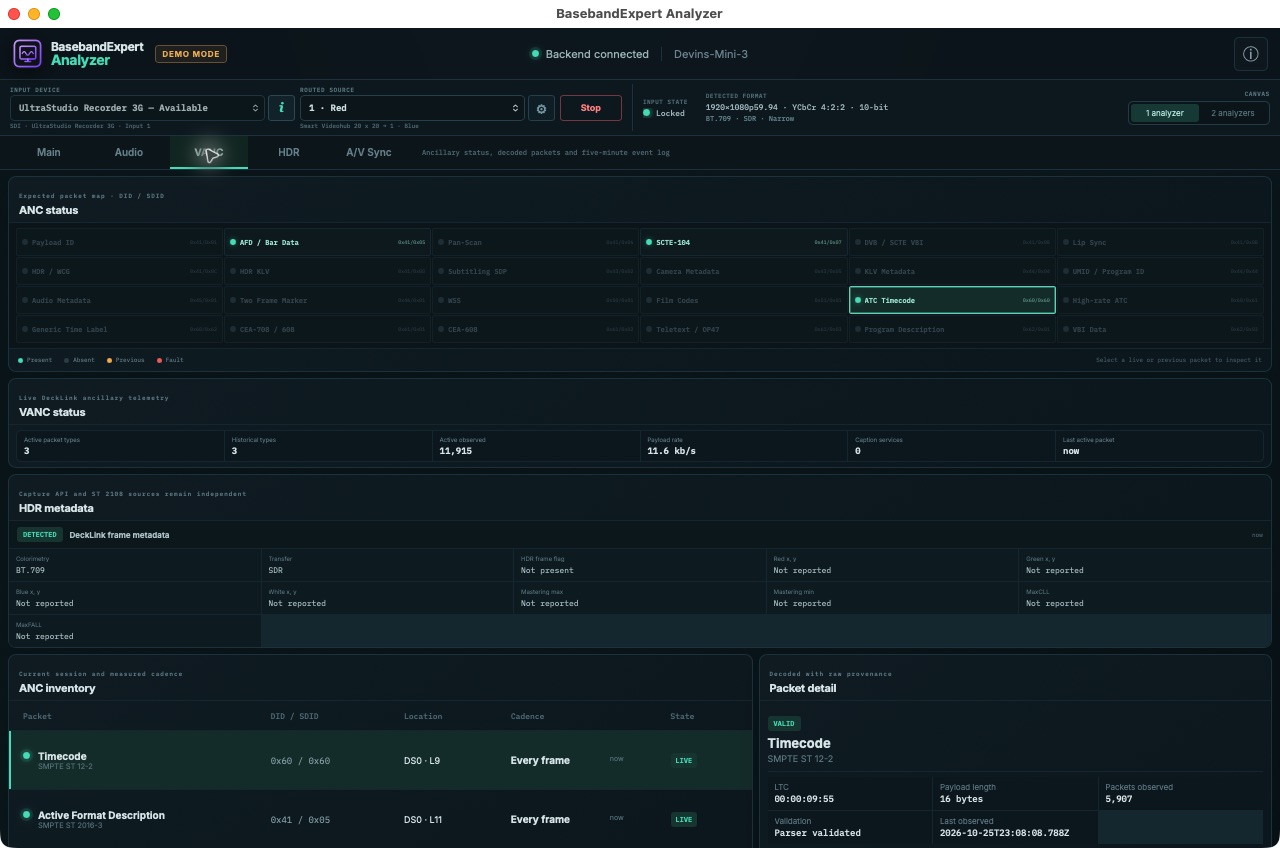
VANC
Trace decoded meaning back to the packet.
The VANC tab combines expected packet types, live status, decoded values, raw payload context, and history so an ancillary-data symptom can be followed to its source.
DID/SDID, line, cadence, presence, and packet counts
Decoded AFD, timecode, SCTE-104, HDR metadata, and captions
Rolling event history for intermittent faults
VANC · live packet map, inventory, decode, and history
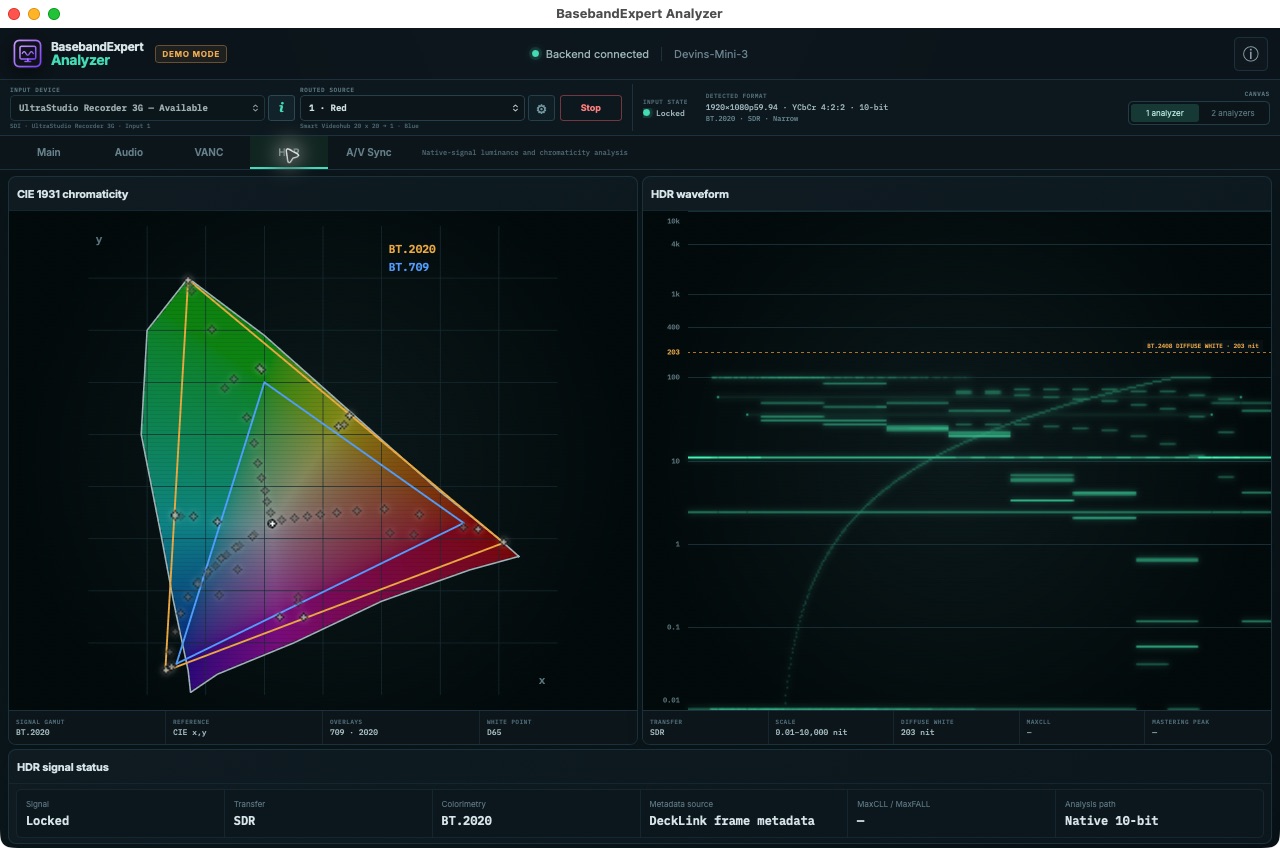
HDR
See color volume and luminance in signal-native terms.
The HDR tab pairs a CIE 1931 chromaticity display with a luminance waveform scaled in nits, helping engineers evaluate gamut, transfer behavior, diffuse white, and available mastering metadata together.
BT.709 and BT.2020 gamut overlays with D65 white point
HDR waveform from 0.01 to 10,000 nits
Signal transfer, colorimetry, metadata source, MaxCLL, and mastering peak status
HDR · chromaticity, luminance, and received signal metadata
A/V Sync
Turn lip-sync timing into a per-channel measurement.
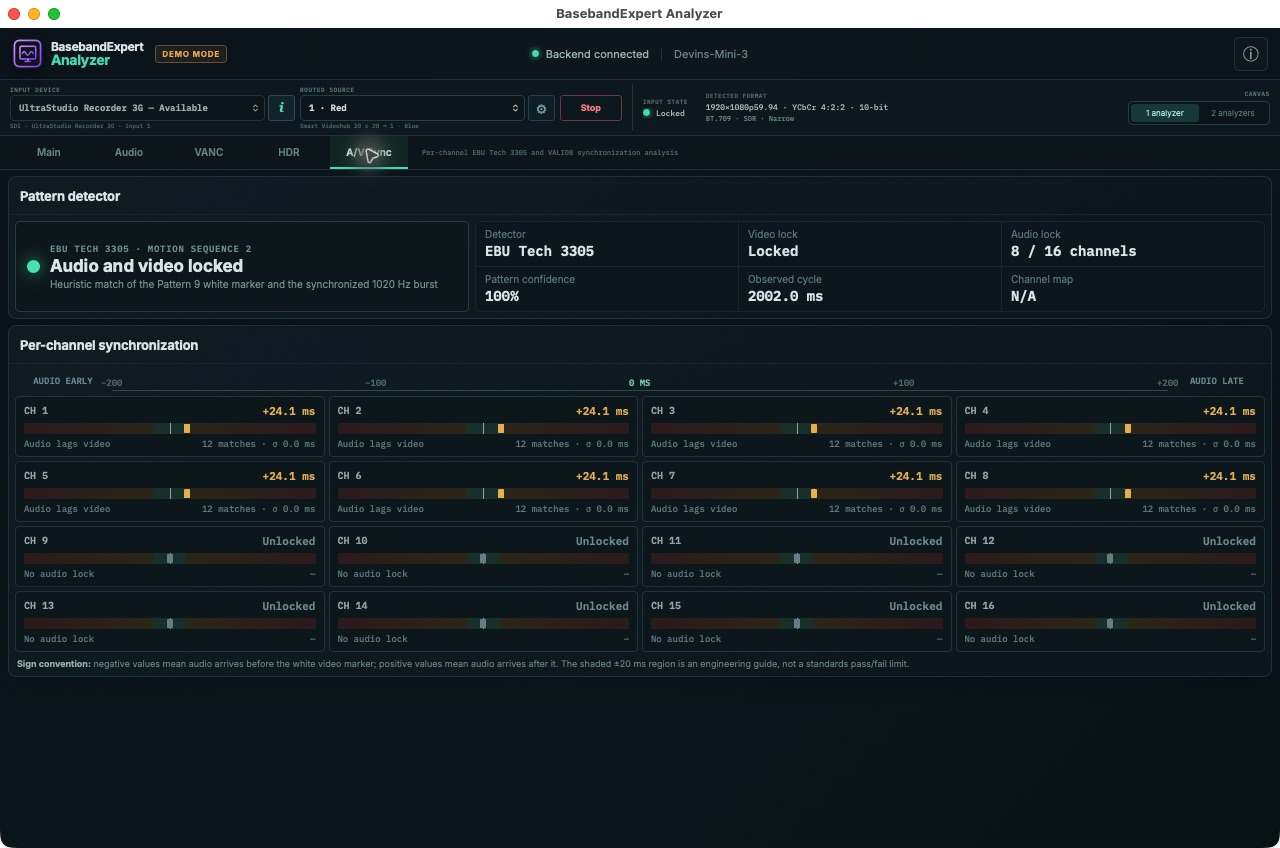
The A/V Sync tab recognizes both EBU Tech 3305 Motion Sequence 2 and the Probel/Vistek VALID pattern, correlates their video and audio events, and reports the timing of every detected channel.
Video and audio lock with pattern confidence and observed cycle
Per-channel offset, match count, and jitter
Clear early/late sign convention for troubleshooting
A/V Sync · EBU Tech 3305 lock and per-channel timing
One application, three input types
Analyze professional video signals without splitting the investigation across tools.
Use the same inspection workflow for baseband SDI, SMPTE ST 2110, and NDI® sources. The signal view stays connected to the scopes, decoded metadata, audio measurements, and capture-health evidence that explain what is wrong.
SDI analyzer
Inspect live baseband signals.
Capture through supported Blackmagic Design interfaces and evaluate picture, 10-bit scopes, embedded audio, loudness, captions, VANC, HDR, and A/V timing.
ST 2110 analyzer
Bring media and network state together.
Receive grouped video, audio, and ANC through supported ST 2110 hardware and keep available PTP, NMOS, RTP, interface, and capture status alongside the content.
Engineering workflow
Trace symptoms to evidence.
Move from a visible picture or audio problem to the corresponding measurement, decoded packet, history, or per-channel timing result without leaving the application.
Analyzer FAQ
Questions engineers ask when choosing an analyzer.
What can the SDI analyzer measure?
It presents live picture, waveform and vectorscope views, up to 16 audio channels, ITU-R BS.1770 loudness, captions, decoded ancillary data, HDR information, A/V sync, and capture-health status.
Does it analyze SMPTE ST 2110 signals?
Yes, with supported Blackmagic Decklink IP 100G inputs. The Analyzer selects grouped media through NMOS and reports available PTP, NMOS, RTP, network, interface, and capture status alongside the signal instruments.
Can it decode captions and VANC packets?
Yes. It inventories ANC packets and decodes supported AFD, timecode, SCTE-104, HDR metadata, and CEA-608/708 caption data with raw payload context and history.
Is this a hardware waveform monitor?
No. BasebandExpert Analyzer is software for macOS and Linux that works with supported capture hardware. It is intended for interactive engineering inspection rather than replacing every function of a dedicated hardware instrument.
Role in the suite
Analyzer tests depth.
Generator provides a repeatable SDI test signal. Router puts it at the required destination. Analyzer concentrates interactive picture, scope, audio, loudness, caption, ANC, HDR, and timing inspection on the signal an engineer is troubleshooting.
Inputs and routing
SDI, ST 2110, and NDI® capture
SDI interfaces
Blackmagic DeckLink capture devices or DekTec DTU-351. Automatic input-format detection and selectable hardware connectors
ST 2110 interfaces
Blackmagic DeckLink IP 100G inputs with grouped video, audio, and ANC source selection through NMOS IS-04 and IS-05.
NDI input
Discovery and receive of high-bandwidth NDI® sources by name or URL, with video and up to 16 channels of audio available to the Analyzer.
SDI router control
Optional Blackmagic Videohub source routing for DeckLink and DTU-351 inputs, with discovered or manually configured routers and observed-route confirmation.
Analyzer sessions
One or two independently selectable inputs with persistent device choices and separate picture, scopes, audio, captions, ANC, and capture status.
Picture monitor
Live picture with caption and AFD presentation controls.
Video scopes
Signal diagnostics
Waveform
10-bit luma overlay, RGB parade, and selectable-line modes.
Signal measurements
Luma and chroma extrema, sampled-pixel totals, and legal-range excursion measurements.
Vectorscope
10-bit YCbCr density display with colorimetry-aware BT.601, BT.709, and BT.2020 targets at 75% and 100%.
Workspaces
Dedicated Main, Audio, VANC, HDR, and A/V Sync tabs, with full-screen instrument views available from the Main workspace.
Audio
Channels and loudness
Acquisition
Up to 16 channels of 48 kHz PCM audio.
Level metering
Selectable peak and RMS values with channel-pair grouping and signal presence.
Loudness
ITU-R BS.1770 momentary, short-term, integrated, loudness range, target delta, maximum momentary, and maximum sample peak.
Profiles
EBU R128, ATSC A/85, and custom target selection.
Ancillary data
Inventory and decode
Inventory
Live packet status with DID/SDID, line, data-stream index, measured cadence, presence state, packet counts, and raw payload context.
Decoded data
SMPTE ST 2016-3 AFD, SMPTE ST 12-2 and ST 12-3 timecode, and SCTE-104 messages.
HDR metadata
Blackmagic Decklink frame metadata and received SMPTE ST 2108-1 packets are presented as independent sources.
Captions
CEA-608 carried in CEA-708 CDPs with CC1–CC4, services 1–6, and packet, service-block, size, sequence, and error counters.
History
Rolling five-minute ANC activity grouped by packet identity.
HDR
Color and luminance
Chromaticity
CIE 1931 density display with BT.709 and BT.2020 gamut overlays and D65 white point.
Luminance
Nit-scaled HDR waveform from 0.01 to 10,000 nits with a BT.2408 diffuse-white reference.
Signal status
Transfer, colorimetry, metadata source, MaxCLL, MaxFALL, and mastering-peak presentation when supplied by the signal.
A/V synchronization
Pattern-based timing
Patterns
EBU Tech 3305 Motion Sequence 2 and Probel/Vistek VALID detection with video lock, audio lock, confidence, and observed cycle.
Channels
Per-channel audio/video offset, match count, jitter, and early/late presentation for every detected channel.
Standards and health
Current coverage
Video and color
10-bit YCbCr 4:2:2 capture with BT.601, BT.709, and BT.2020-aware scope presentation.
Audio
48 kHz PCM and ITU-R BS.1770 loudness with EBU R128, ATSC A/85, and custom target profiles.
Captions
CEA-608 and CEA-708 CDP carriage with live caption overlay.
Capture health
Signal and ANC lock, detected mode, and dropped-frame status; ST 2110 inputs also report available PTP, NMOS, RTP, network, and interface status.
macOS
Apple silicon desktop
macOS 14 or later on Apple silicon.
For SDI capture: Blackmagic Design UltraStudio Recorder 3G with Blackmagic Desktop Video version 16.0 or later installed, or a DekTec DTU-351 connected by USB 3.0.
For NDI® capture: an Ethernet network capable of carrying the selected video format.
Compatibility note: the older UltraStudio Recorder is not supported on Apple silicon platforms. The DTU-351 uses the driver bundled with Analyzer and does not require a separate DekTec driver installation.
Linux
Linux workstation
64-bit Linux.
For SDI capture: a compatible Blackmagic Decklink capture device with Blackmagic Desktop Video version 16.0 or later installed.
For NDI® capture: an Ethernet network capable of carrying the selected video format.
Release history
Analyzer changelog.
New capabilities, workflow improvements, and bug fixes included in each public release.
Version 1.4 Current release
More SDI hardware choices and clearer input health.
New
Support for DekTec DTU-351 on macOS.
Selectable DeckLink input connectors, including SDI and HDMI on supported hardware.
Persistent per-analyzer input choices that are restored after restart when the device remains available.
Fixed & improved
Improved display of unstable HDMI signal sources.
Frame-delivery interruptions produce visible warnings and recovery events, then clear after stable input resumes.
Native capture updates improve preview cadence and ST 299 ancillary-data handling.
Version 1.3
Fault evidence, low-latency preview, and offline licensing.
New
Persistent signal, capture, and session event history with CSV and JSON export.
Configurable measurement alarms, alarm lifecycle tracking, and pre-trigger evidence bundles.
Selectable low-latency live preview with automatic hardware acceleration.
Offline perpetual licensing with signed .belicense files and a full-featured 15-minute trial.
Fixed & improved
Active A/V sync validators are identified while signal detection is in progress.
Outdated Blackmagic Desktop Video installations show actionable guidance.
Caption rendering uses IMSC.js 2.0 for improved standards compatibility.
Version 1.2
Hardware-free evaluation and NDI® analysis.
New
A configurable Virtual Input that exercises the same processing pipeline as a live source.
NDI source discovery and analysis alongside DeckLink input.
A first-run walkthrough for picture, scopes, audio, VANC, HDR, A/V sync, and dual-analyzer workflows.
Fixed & improved
Demo captions are guarded when the selected video rate is unsupported.
Version 1.1
Production-ready distribution and evaluation.
New
A signed and notarized Apple silicon installer with a drag-to-Applications workflow.
Full-featured 15-minute demo sessions with a visible Demo mode indicator.
Version 1.0
Initial release of BasebandExpert Analyzer.
New
Live picture, waveform, vectorscope, and sixteen-channel audio analysis.
Loudness, HDR and color, A/V sync, caption, and VANC inspection.
DeckLink device inspection and side-by-side analysis of two inputs.
BasebandExpert Analyzer
Download the evaluation.
This is a full-featured evaluation build of BasebandExpert Analyzer. Each evaluation session runs for fifteen minutes, after which the application exits.
Perpetual named license: $199 USD. A purchased license is delivered as a portable .belicense file. Import it from the application’s About dialog; installation and all later validation work without an internet connection. See how to install your license.