BasebandExpert blog

Analyzing ST2110 Packet Timing Without $20000 worth of hardware

You don't really need a super expensive ST2110 analyzer to investigate your stream timing...

  • analyzer
  • st2110

So I'm doing some work on the BasebandExpert Generator, in particular around creating conformant ST2110 streams with commodity (Mellanox) hardware. This raises the obvious question: how do I know if the streams I'm creating are conformant? When using a dedicate ST2110 card you can probably take it for granted that it's going to be right, and complain to the hardware vendor if you have issues. In this case, since I'm the person making the streams, I need to do some evaluation myself.

And let's be honest: I'm cheap. I'm not going to go out and spend $20k on a Phabrix QxL and then another $4k on the various software options needed to do advanced 2110 timing measurement. And to be fair, I give them a lot of credit in creating a great product and I'm sure they've done a ton of work testing and acquiring various certifications.

But can I get 95% of that capability without spending that sort of money? I think so....
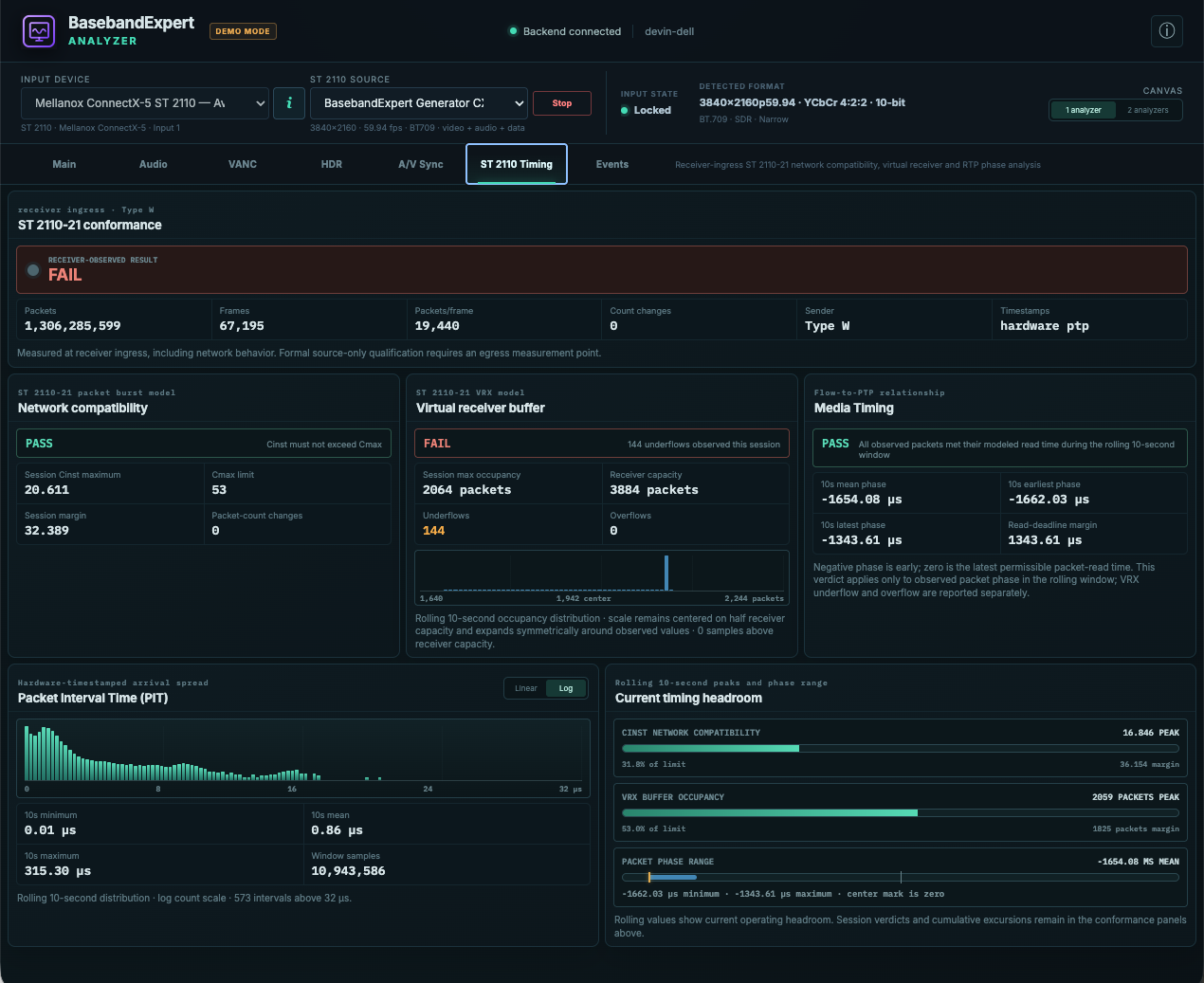
Yes, this is intentionally a failure case because it's less boring....

So I went off and added a new panel to the BasebandExpert Analyzer. And this is a big advantage of using a real network card rather than one of the commercial dedicated ST2110 cards out there: in the interest of convenience they just give you frames of video/audio/vanc, but a consequence of that is you're not able to get the gory details. Here I can look at the raw packets, report loss, analyze the timing details, and do real conformance testing.

In the interest of full disclosure, this is still a work in progress, and it's on the Linux version currently (which still hasn't been released), but I figured it would be fun to talk about some of the cool stuff that is coming...
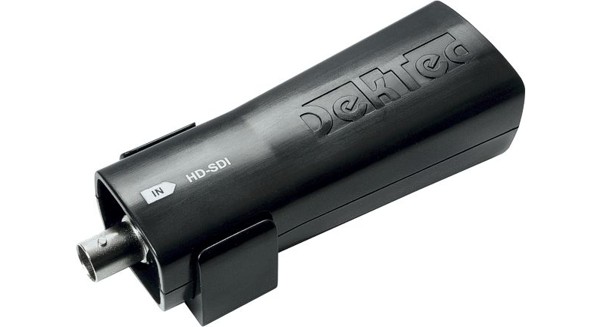
Analyzing SDI feeds with the Dektec DTU-351, even on MacOS

Use the Dektec DTU-351 SDI capture device to visualize SDI feeds, even on MacOS (where Dektec says it isn't supported)!

  • sdi
  • dektec
  • analyzer
Dektec DTU-351 HD-SDI capture device

So I've always been a fan of the DekTec DTU-351 SDI capture device. It works on Windows and Linux, is easy to plug into a laptop in the field, and supports the DekTec SDEye analyzer application on Windows.

Despite it being limited to HD-SDI (i.e. no support for 3G 1080p59), it's still a handy little device. Comparing it against the Blackmagic UltraStudio devices, it gives me full access to VANC/HANC, and because it connects with USB3 rather than Thunderbolt it works on lots of different PC based platforms (both desktops and laptops).

I've always been a bit annoyed though that I couldn't use it on my MacBook laptop, which is the laptop I use on a daily basis. This is really a result of two issues:

  • Dektec doesn't write MacOS hardware drivers for their devices
  • Even if they did, there is no MacOS version of the SDEye application

So in a past life I wrote lots of open source Linux kernel drivers for video capture devices, so this is an area I understand well. I know the Cypress FX3 and Gennum SDI receiver chip in the device and am sure in a few days of reverse engineering with my USB analyzer I could hack together a driver that basically works.

But I had a fun idea: how fast can ChatGPT/Codex write me a driver based purely by looking at the very-permissibly licensed Dektec Linux kernel driver? The answer: it wrote a driver from scratch, worked through various firmware issues, implemented video/audio/VANC capture, and integrated it into the BasebandExpert Analyzer in less than two hours. And because it's written entirely in userland (i.e. libusb), a driver bug can't result in crashing the whole system.

Does this have any commercial value? Probably not. The Dektec DTU-351 is a relatively old piece of hardware, and historically it's always been significantly more expensive than comparable Blackmagic devices which have almost the same feature set (if not better). But it scratches my own itch so I'm going to leave it in there.

Do you have a DTU-351 that you've always wanted to use on your Mac? Give the new build a try and I welcome feedback and bug reports...

Version 1.3 Now Available!

Version 1.3 is now available, including bug fixes and the ability to actually buy the analyzer and generator.

  • releases

So like with most new products, I spent the week shaking out some bugs, dealing with edge cases, and other sundry items. I'm happy to announce that release 1.3 of the BasebandExpert Generator and BasebandExpert Analyzer are now available for download.

Also worth noting that I've built out the purchasing frontend should you feel you want to show your support and/or use the product for more than fifteen minutes. The prices are as follows:

  • BasebandExpert Generator: $99.00
  • BasebandExpert Analyzer: $199.00
  • BasebandExpert Router: Totally free

I hope others will find these tools useful and the prices reasonable. In either case, I am happy to hear feedback/comments from you!

One other note: I know many people out there are using Windows. I'm acutely aware of that. I've got a Windows version working here in the lab and am mainly just waiting for my code signing stuff to go through with Microsoft. I'll announce as soon as I have something worth reporting....

Announcing Version 1.2!

Announcing Version 1.2 of BasebandExpert Analyzer and BasebandExpert Generator, with support for NDI and virtual devices!

  • releases
  • analyzer
  • generator

After some continued debugging/development, I'm happy to announce release 1.2 of the BasebandExpert Analyzer and Generator products.

Changes

  • Each app now has a "virtual" device, which lets you play with the app even if you don't have any hardware connected.
  • Preliminary support for NDI both in the Generator and Analyzer. You can run them back-to-back to exercise them together.
  • Walkthrough for new users that explain how to use the product.

As always, comments and feedback are welcome!

Why I Built BasebandExpert

An engineering story about turning hard-to-explain professional media behavior into controlled signals, visible state, and useful evidence.

  • engineering
  • product-design

So over the years, I've used baseband products from many product vendors: Evertz, Leader, Phabrix, Tektronix, Dektec, to just name a few. I've always experienced a few common themes:

  • These products can be ridiculously expensive, as they're sold in low volume and designed for companies that can afford them.
  • Often they have a complex licensing scheme where the base functionality is available at a fixed price, and then there is a huge menu of a la carte features for additional money.
  • Sometimes I kept finding myself saying, "This is almost what I want, but I need this one minor feature to make it work for my use case, and I can't simply add that to the product." The feature isn't important enough and/or I don't have enough influence to get the vendor to add the feature.

Now when I have worked in broadcast, the price isn't always the issue. But as a lowly engineer just trying to get his job done, when I need some additional feature then the mechanics of reaching out to Sales, getting a quote, getting approval from my manager, talking to my finance department to get a purchase order issued, and placing the order can be a massive headache. And at each stage I have to justify "why" the item is needed...

I'll admit it: I'm a video nerd. I've spent years building such solutions for in-house applications at different jobs. And I'm a sucker for standards, testing tools, deep protocol analysis, and validation methodology.

BasebandExpert is all about democratizing access to such technology. Let's build first-class applications that compete with the "big boys", but make them available at prices that are either free or cheap enough that you can put it on your credit card and not break the bank.

Do these solutions provide the same hardware level features that some products do? Nope. You won't able to get physical layer eye diagrams and jitter analysis. But in my experience, that's the 5% use case. Everything else can be accomplished with commodity capture/generation hardware running on commodity workstations.